Automating Steel QC: A Complete Guide to Vision-Based Inspection Setup
A Developer's Guide to Setting Up Inspection Systems in Steel Manufacturing
Context: The Steel Manufacturing Challenge
You run a steel manufacturing unit. Your current QC process involves manual inspectors checking for surface defects—scratches, cracks, rust spots, dimensional variations—on steel sheets, pipes, or coils moving continuously on conveyor belts. You want to automate this using computer vision.
The Critical Requirement: REAL-TIME INSPECTION
Unlike lab setups or static inspection, your products are constantly moving at 1-3 meters per second. You must:
- Capture images of moving products without blur
- Detect defects in <50ms while the product is still in frame
- Make decisions instantly (Pass/Reject/Mark) before the product moves to next station
- Trigger actions (sorting gates, marking systems) synchronized with conveyor speed
- Never stop the production line - decisions happen in real-time, not batch processing
Key Real-Time Challenges:
- Motion blur: Product moves 5-15cm during typical camera exposure
- Timing precision: Must capture image at exact position (±1mm accuracy)
- Processing speed: AI inference must complete before next product arrives
- Data streaming: Continuous data flow from cameras (450 MB/sec per camera)
- Immediate action: Physical mechanisms must respond within 100-200ms
- Zero buffer time: Can't "pause and process" - everything happens live
This guide shows you how to build a system that inspects, decides, and acts while products are moving, not after they stop.
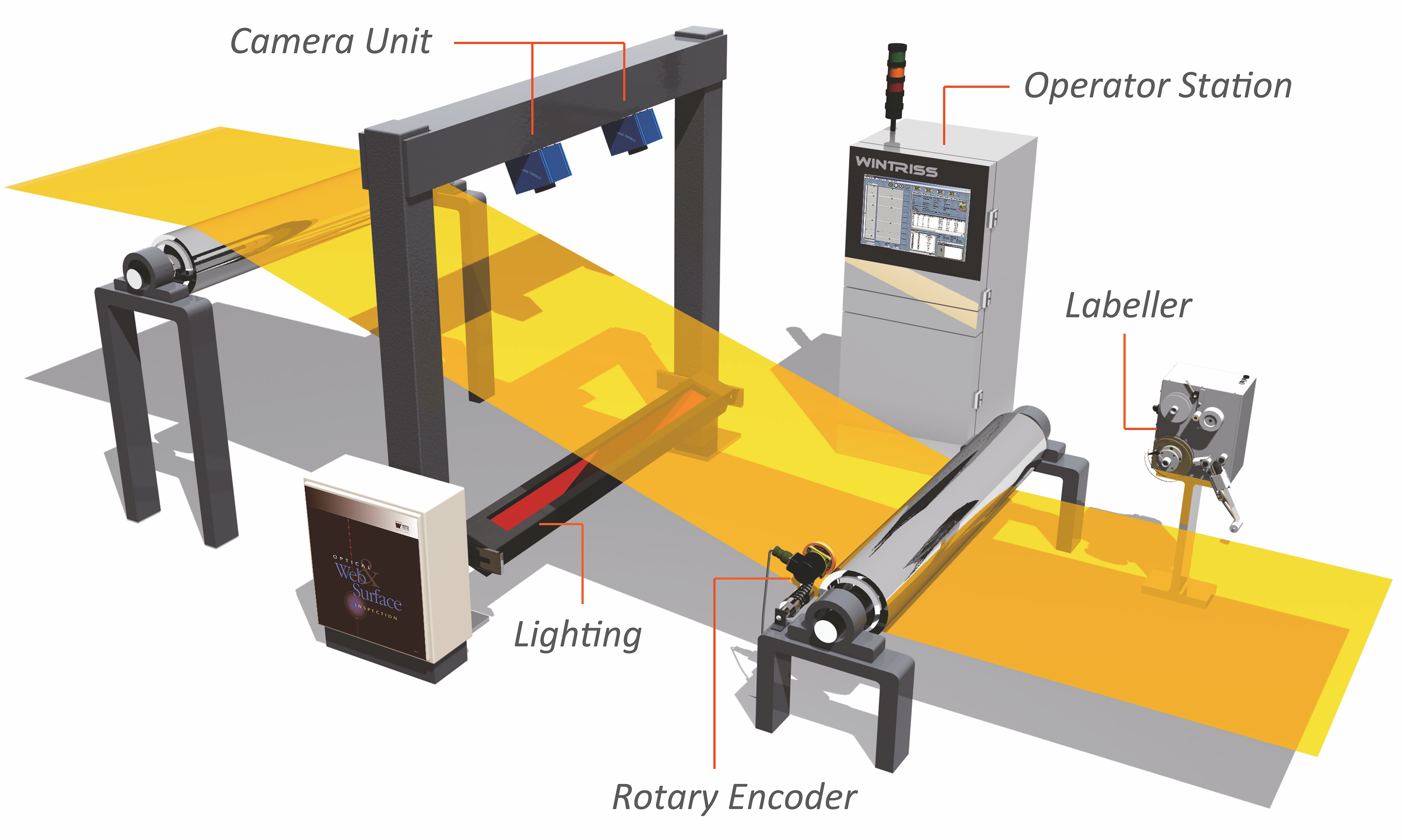 Complete vision inspection system architecture showing camera, lighting, processing, and control components
📹 Reference Videos
Before diving in, watch these practical implementations:
- Surface Inspection System in Action - Real-world steel defect detection system
- Vision System Setup & Configuration - Complete hardware setup walkthrough
1. Camera Setup (Frame Rate, Resolution, ISO, Temperature)
Problem: Steel Manufacturing Challenges
Problem: Capturing Moving Products Without Blur
Real-time motion challenges:
- Steel sheet moving at 2 m/s travels 2mm in 1ms
- Standard 10ms exposure = 20mm blur = defects become invisible
- Product arrives every 0.5-2 seconds = must capture, process, decide in <500ms
- Global shutter required - rolling shutter creates skewed images of moving objects
- Precise triggering - must capture at exact position (not random timing)
The Math:
Conveyor Speed: 2 m/s
Product Length: 1 meter
Time product is in view: 0.5 seconds
Required shutter speed to freeze motion: 1/5000s (0.2ms) or faster
→ Product moves only 0.4mm during capture = acceptable blur
Solution: Real-Time Capture System Configuration
Camera Type (CRITICAL: Must have Global Shutter + External Trigger):
- Use industrial machine vision cameras with global shutter
- Recommended: Basler, FLIR, Allied Vision (IP67-rated for dust/water protection)
- GigE cameras mandatory for real-time streaming (USB3 has latency issues)
Hardware Recommendations & Costs
Option 1: Entry-Level Real-Time Setup (Conveyor speed up to 2 m/s)
-
Camera: Basler ace 2 (5 MP, 30 FPS, GigE, Global Shutter)
- Cost: $800-1,200 per camera
- Why: Global shutter freezes motion, GigE streams continuously to edge PC
- Interface: GigE allows 100m cable runs + low latency (<1ms)
- Real-time capability: Can inspect 30 products/second
-
Lens: Computar M2518-MPW2 (25mm, C-mount)
- Cost: $150-250 per lens
- Why: Low distortion, fast aperture (f/1.4) for short exposures
-
Enclosure: Custom IP67-rated housing with cooling
- Cost: $300-500 per camera
- Why: Protects from dust, sparks, and ambient temperatures up to 60°C
Total per camera station: ~$1,500-2,000
Option 2: High-Speed Real-Time Production (Conveyor speed 3-5 m/s)
-
Camera: FLIR Blackfly S (12 MP, 120 FPS, GigE, Global Shutter)
- Cost: $2,500-3,500 per camera
- Why: 120 FPS captures multiple images per product, eliminates all motion blur
- Real-time capability: Can inspect 120 products/second with multi-image averaging
-
Lens: Kowa LM12HC (12mm, high-resolution)
- Cost: $400-600 per lens
- Why: Supports 12MP resolution without edge distortion, fast f/1.8 aperture
-
Enclosure: Industrial-grade with active cooling
- Cost: $600-800 per camera
- Why: Active cooling handles sustained high-speed operation heat
Total per camera station: ~$4,000-5,000
Why Industrial Cameras Over Consumer Cameras for Real-Time?
- Global shutter: Captures entire frame instantly (0.2ms) - no motion artifacts
- External hardware trigger: Camera fires exactly when proximity sensor detects product position
- Industrial interfaces (GigE): Continuous streaming with <1ms latency (USB3 has 10-50ms delays)
- Deterministic timing: Frame arrives exactly when expected (critical for real-time decisions)
- Operating temperature: -20°C to +70°C vs consumer cameras' 0°C to 40°C
- MTBF (Mean Time Between Failure): >100,000 hours vs consumer cameras' <10,000 hours
- SDK support: C++/Python libraries for custom integration with PLCs and edge devices
Frame Rate:
- Minimum 30 FPS for moving products
- 60-120 FPS if steel moves faster than 2 m/s
- Higher frame rate = less motion blur = sharper defect detection
Resolution:
- 5 MP minimum for detecting small scratches (0.5mm)
- 12 MP if you need to inspect fine surface texture
- Rule: 1 defect should cover at least 10x10 pixels for reliable detection
ISO & Exposure:
- Low ISO (100-400) to reduce noise
- Fast shutter speed (1/5000s or faster) to freeze motion
- Use triggered capture synced to product position (not free-running)
Temperature & Protection:
- Steel plants have 40-60°C ambient temperatures
- Use cameras rated for -20°C to +70°C
- Install cooling enclosures or air purge systems if near furnaces
- Add protective glass windows to shield from dust and sparks
Mounting:
- Rigid vibration-dampening mounts
- Position cameras perpendicular to surface (avoid angled reflections)
- Distance from product: 0.5m to 2m depending on lens and resolution
- Use C-mount lenses with appropriate focal length
Real-Time Triggering System (CRITICAL for Moving Products)
The Challenge: Without precise triggering, camera captures random positions = inconsistent inspection + missed defects
Solution: Hardware-Triggered Capture
REAL-TIME FLOW (happens in <10ms):

[Proximity Sensor] detects product arrival
        ↓ (0.5ms - hardware signal)
[Encoder/PLC] calculates exact position
        ↓ (1ms - computation)
[Trigger Signal] sent to camera
        ↓ (0.5ms - electrical signal)
[Camera] captures image (global shutter in 0.2ms)
        ↓ (immediate)
[GigE Transfer] streams to edge PC (5ms for 5MP image)
        ↓ (starts immediately)
[AI Inference] runs on edge device (10-50ms)
        ↓ (immediate)
[Decision] sent to PLC (1ms)
        ↓ (immediate)
[Actuator] sorts/marks product (50-100ms mechanical delay)

Total time: 70-150ms (product moves only 14-30cm during entire process)
Required Hardware for Real-Time Triggering:
-
Proximity Sensor (Photoelectric):
- Model: Banner Q45 or Omron E3Z
- Cost: $50-150
- Response time: <1ms
- Why: Detects product arrival, triggers entire inspection sequence
- Positioning: 20-50cm before camera field of view
-
Rotary Encoder (Optional but Recommended):
- Model: Kubler 05.2400 series
- Cost: $200-400
- Why: Tracks exact conveyor position (mm accuracy), enables predictive triggering
- Benefit: Can trigger camera when product reaches optimal position, not just "when detected"
-
Hardware Trigger Module:
- Built into industrial cameras (digital input pins)
- Latency: <0.5ms from sensor signal to camera capture
- Why critical: Software-based triggering has 10-50ms delays (too slow for moving products)
Practical Setup:
    [Proximity Sensor] ← 30cm before camera
            ↓
    [Product moving at 2 m/s]
            ↓
    [Camera captures] ← exactly when product is centered
            ↓
    [LED strobe flash] ← synchronized with camera (1ms pulse)
            ↓
    [Edge PC processing] ← image arrives within 5ms
            ↓
    [Decision point] ← 50ms after capture
            ↓
    [Reject gate 1m ahead] ← actuates 100ms before product arrives
Example: Industrial Camera Setup
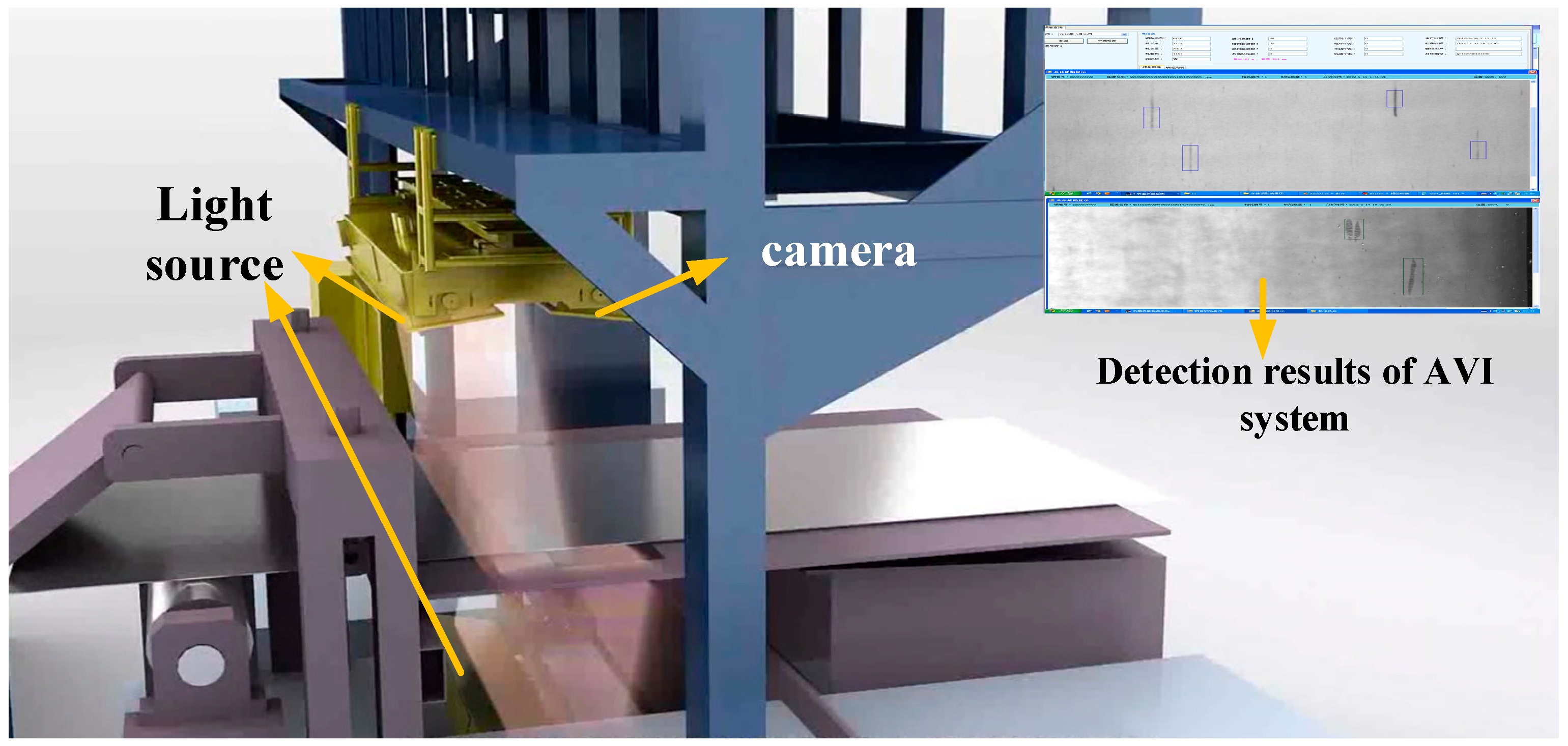 Industrial vision system with camera, sensors, and lighting configuration for quality inspection
2. Lighting Setup
Problem: Steel Reflects, Creating Unusable Images
Why normal lighting fails:
- Direct lighting creates bright hotspots (specular reflection)
- Shadows hide defects
- Inconsistent ambient light changes image appearance
Solution: Controlled Industrial Lighting Setup
Lighting Type:
- Diffused LED line lights or dome lights (to minimize reflections)
- Polarized lighting to eliminate glare on shiny surfaces
- Dark field lighting to highlight scratches and surface irregularities
Lighting Hardware & Costs
Option 1: Line Light (For Flat Steel Sheets)
- CCS LDL2-50x200SW (Diffused White LED Line Light)
- Cost: $400-600 per light
- Output: 25,000 lumens
- Why: Uniform illumination across 200mm width, reduces hotspots on reflective surfaces
- Lifespan: 50,000+ hours (6+ years continuous operation)
Option 2: Dome Light (For Complex Surfaces/Curved Steel)
- Advanced Illumination DL164 (LED Dome Diffuser)
- Cost: $1,200-1,800 per dome
- Why: 360° diffused light eliminates all shadows and reflections
- Best for: Cylindrical products, pipes, complex geometries
Option 3: Dark Field Lighting (For Surface Scratches)
- Smart Vision Lights DF-SISL (Dark Field Line Light)
- Cost: $500-800 per light
- Why: Highlights scratches and surface irregularities by lighting from extreme angles
- Contrast: 10x better scratch detection vs standard lighting
Why LED Over Halogen/Fluorescent?
- No warm-up time: Instant full brightness
- Stable output: No flickering at high camera speeds (critical for 120 FPS capture)
- Low heat: Halogen lights reach 200°C; LEDs stay under 50°C
- Energy efficiency: LEDs use 80% less power (30W vs 150W for equivalent brightness)
- Longevity: 50,000 hours vs 2,000 hours for halogen
Power Supply & Controllers:
- LED Controller with Strobe Function: $200-400
- Why: Synchronizes light pulse with camera capture to increase effective brightness without overheating
- Benefit: Can achieve 2x brightness for 1ms exposure vs continuous lighting
Total Lighting Cost per Inspection Station: $800-2,500 (depending on setup complexity)
Lighting Placement:
- 45-degree angle to surface (reduces direct reflections back to camera)
- Multiple light sources to eliminate shadows
- Enclosed inspection zone to block ambient factory lighting
Brightness & Consistency:
- High-intensity LEDs (20,000+ lumens) for fast shutter speeds
- Use constant current drivers to avoid flickering
- Calibrate white balance regularly to maintain color consistency
Example Setup for Steel Sheets:
        [LED Dome Light]
              ↓
      ┌───────────────┐
      │  Steel Sheet  │ ← Diffused light reduces glare
      └───────────────┘
              ↑
          [Camera]
For Cylindrical Steel (Pipes):
- Use 360-degree ring lights
- Mount camera at 90-degree angle to pipe axis
- Rotate pipe or use multiple cameras
3. Real-Time Data Pipeline: Streaming, Processing & Storage
Problem: Continuous Data Stream from Moving Products
Real-time data challenges (NOT batch processing):
- 1 camera at 30 FPS, 5 MP images = 450 MB/sec = 1.6 TB/hour continuous stream
- No buffering allowed: Must process each frame as it arrives (can't "pause and batch")
- Multiple cameras = multiply data by number of cameras
- Processing deadline: Must complete AI inference before next frame arrives (33ms at 30 FPS)
- Storage bottleneck: Can't store everything - must decide in real-time what to keep
- Network saturation: Multiple camera streams can overwhelm switches
The Real-Time Requirement:
Frame captured → Transfer (5ms) → AI Inference (10-50ms) → Decision (1ms) → Action (100ms)
                 ↓
         Next frame already arriving (33ms later at 30 FPS)
         Can't wait or buffer - must keep up with stream!
Solution: Edge-Based Real-Time Processing Architecture
Why Edge Computing is MANDATORY for Real-Time:
- Cloud is too slow: 200-500ms round-trip latency = product already moved past action point
- No buffering: Product doesn't wait for processing - it keeps moving
- Network limitations: Can't upload 1.6 TB/hour per camera to cloud
- Reliability: Production line can't stop if internet fails
Real-Time Data Flow:
CONTINUOUS STREAM (never stops):

[Camera] ─(GigE)─> [Edge PC] ─(immediate)─> [AI Inference] ─(1ms)─> [PLC Decision]
   ↓                   ↓                           ↓                      ↓
30 FPS             RAM buffer              GPU processing           Pass/Reject/Mark
streaming          (3-5 frames)            (<50ms/frame)           triggers actuator
               ↓
        Only if DEFECT detected:
               ↓
        [Write to disk] + [Log to database]
               ↓
        (background thread - doesn't block stream)
Edge Computing Hardware & Costs (Real-Time Focused)
Option 1: Entry-Level Real-Time (1-2 Cameras, 30 FPS)
- NVIDIA Jetson Orin Nano (8GB)
- Cost: $500-700
- Real-time performance: Processes 30 frames/sec with 25ms inference time
- Latency: <30ms from frame capture to decision
- Why: Deterministic processing - meets strict real-time deadlines
- Power: 15W (important for enclosed spaces with limited cooling)
- Handles: 2 cameras at 30 FPS streaming continuously
Option 2: Production Real-Time (4-8 Cameras, 60-120 FPS)
- NVIDIA Jetson AGX Orin (64GB)
- Cost: $2,000-2,500
- Real-time performance: Processes 120 frames/sec with 8ms inference time
- Latency: <15ms from frame capture to decision
- Why: Can handle burst loads when multiple products arrive simultaneously
- Handles: 8 cameras simultaneously with multi-model inference
- Memory bandwidth: Critical for real-time streaming (204 GB/s)
Option 3: High-Performance Real-Time (8+ Cameras, Complex Models)
- Industrial PC with NVIDIA RTX A4000
- Cost: $4,000-6,000
- Real-time performance: Processes 200+ frames/sec with 5ms inference time
- Why: More flexibility for custom models, easier maintenance, can run multiple AI models simultaneously
- GPU: RTX A4000 (16GB VRAM) for larger models like Mask R-CNN
- Industrial-grade: Fanless cooling, -20°C to +60°C operating temp
Why Edge Computing vs Cloud for Real-Time?
- Latency: <15-50ms processing vs 200-500ms cloud round-trip (product moves 40-100cm while waiting for cloud!)
- Deterministic: Guaranteed processing time - no internet variability
- Reliability: Production line never stops even if internet fails
- Cost: No ongoing cloud inference fees ($0.001-0.01 per image = $25,000-250,000/year for 24/7 operation)
- Data privacy: Sensitive production data stays on-premise
- Bandwidth: Physically impossible to upload 1.6 TB/hour per camera to cloud
Real-Time Data Storage Strategy (What to Keep vs Discard)
The Problem:
- Can't store everything (38 TB/day per camera = $50,000/year storage costs)
- Can't stop to decide what to store (product keeps moving)
- Must store defects for analysis BUT most products are good
Real-Time Storage Decision Flow:
EVERY FRAME (happens in real-time):

[AI Model inference: 20ms]
        ↓
  Is it a defect?
   /           \
 NO (98%)     YES (2%)
  ↓             ↓
Discard       IMMEDIATE ACTIONS:
image         1. Save image to local SSD (5ms)
              2. Log metadata to DB (1ms - async)
              3. Trigger PLC action (1ms)
              4. Mark product position (for downstream tracking)

              BACKGROUND ACTIONS (don't block stream):
              5. Compress image (200ms)
              6. Upload to NAS (500ms)
              7. Update quality dashboard (100ms)
Storage Hardware:
-
Local SSD (on Edge PC):
- Capacity: 1TB NVMe SSD
- Cost: $100-200
- Why: Ultra-fast writes (3000 MB/s) - can save defect images without blocking stream
- Retention: Last 2 hours of defects (temporary buffer)
-
Network Attached Storage (NAS):
- Capacity: 20TB RAID (for 30-day retention)
- Cost: $1,500-2,500
- Why: Permanent storage for defect images, quality reports, retraining data
- Write speed: 500 MB/s (adequate for background transfers)
-
Database (Time-Series):
- InfluxDB or PostgreSQL + TimescaleDB
- Cost: Free (open-source)
- Stores: Metadata only (timestamps, defect types, product IDs, decisions) - not images
- Why: Fast queries for quality dashboards, trend analysis
What Gets Stored:
- ✅ All defect images (2% of production) - saved permanently (6 months)
- ✅ Defect metadata (timestamp, type, severity, location, decision) - forever
- ✅ Sample good images (1 per minute) - for model drift detection (7 days)
- ✅ Quality statistics (defect rate, camera health, processing time) - forever
- ❌ Good product images (98% of captures) - discarded immediately to save space
Bandwidth Calculation:
1 camera at 30 FPS, 5 MP images = 1.6 TB/hour raw
With 2% defect rate and selective storage:
→ 2% defect images: 32 GB/hour
→ 1 sample/minute good images: 1 GB/hour
→ Total stored: 33 GB/hour (98% reduction!)
→ Daily storage: 800 GB/day (manageable)
→ Monthly storage: 24 TB/month (cost: $50/month cloud, or $1,500 one-time NAS)
Network Infrastructure (for Real-Time Streaming):
- NVIDIA Jetson AGX Orin (64GB)
- Cost: $2,000-2,500
- Why: 275 TOPS AI performance, runs YOLOv8 at 120 FPS
- Handles: 8 cameras simultaneously with multi-model inference
- Interfaces: Multiple GigE ports for camera connections
Option 3: High-Performance (8+ Cameras, Complex Models)
- Industrial PC with NVIDIA RTX A4000
- Cost: $4,000-6,000
- Why: More flexibility for custom models, easier maintenance
- GPU: RTX A4000 (16GB VRAM) for larger models like Mask R-CNN
- Industrial-grade: Fanless cooling, -20°C to +60°C operating temp
Why Edge Computing vs Cloud?
- Latency: <50ms processing vs 200-500ms cloud round-trip
- Reliability: Works even if internet connection fails
- Cost: No ongoing cloud inference fees ($0.001-0.01 per image adds up to $25,000-250,000/year for 24/7 operation)
- Data privacy: Sensitive production data stays on-premise
- Bandwidth: Uploading 1.6 TB/hour to cloud is impractical
Network Infrastructure:
-
Industrial Ethernet Switch (8-port GigE): $300-500
- Why: Supports jumbo frames, VLAN isolation, rugged design
- Example: Moxa EDS-308 or Phoenix Contact FL SWITCH
-
Network Cables: Cat6a/Cat7 (shielded, up to 100m)
- Cost: $1-3 per meter
- Why: Shielding prevents electromagnetic interference from factory motors
Total Edge Computing Cost: $1,500-7,000 (depending on number of cameras and inference speed requirements)
4. Real-Time Problems in Industrial Environment & Solutions
Problem 1: Frame Drops / Missed Products
Symptom: Camera captures image but product already moved past action point
Root Causes:
- Network congestion - frame took 50ms instead of 5ms to reach edge PC
- CPU overload - inference took 100ms instead of 20ms
- RAM buffer overflow - too many frames queued
Real-Time Solutions:
-
Dedicated Network (VLAN Isolation):
- Create separate VLAN for vision system
- Priority queuing - vision packets get highest priority
- Cost: $0 (configuration only)
- Result: Guaranteed 5ms frame transfer time
-
Frame Dropping Strategy (Controlled):
# If inference can't keep up, drop frames intentionally if processing_queue_length > 3: skip_next_frame() # Better to skip than process late else: process_frame()- Why: Better to inspect every 2nd product reliably than inspect all products too late
-
GPU Inference Optimization:
- Use TensorRT (NVIDIA) or OpenVINO (Intel) for 3-5x speedup
- Quantize model to INT8 (2x faster, minimal accuracy loss)
- Result: 20ms inference → 8ms inference = can handle 120 FPS
Problem 2: False Positives Stopping Production Line
Symptom: System flags good products as defective → unnecessary rejections → production stops
Root Causes:
- Dust on lens creates shadow → looks like defect
- Lighting flicker → image too dark → model confused
- Camera vibration → slight blur → false detection
- Model trained on clean images → fails on real factory conditions
Real-Time Solutions:
-
Confidence Thresholding:
if defect_confidence > 0.95: action = "REJECT" # Very confident - act immediately elif defect_confidence > 0.80: action = "MARK_FOR_REVIEW" # Uncertain - let human check later else: action = "PASS" # Low confidence - likely false positive -
Multi-Frame Verification (for critical defects):
# If high-speed camera (120 FPS), capture 3 images per product if 2_out_of_3_frames_show_defect: confidence_increased = True reject_product()- Time cost: 3 frames at 120 FPS = only 25ms extra
- Benefit: Reduces false positives by 80%
-
Automatic Lens Cleaning Check:
- Every 1000 frames, check image brightness histogram
- If average brightness drops 20%, trigger alert: "Clean lens!"
- Cost: $0 (software only)
-
Environmental Adaptation:
- Retrain model monthly with latest factory images (dust, lighting variations)
- Keep "false positive log" - images marked as defects but later confirmed good
- Cost: 2 hours/month labeling + retraining
Problem 3: Conveyor Speed Changes / Product Position Drift
Symptom: Camera triggers at wrong time → product partially out of frame → missed defects
Root Causes:
- Conveyor speed varies (motor load changes)
- Proximity sensor position drifted (vibration moved mounting)
- Product placement inconsistent (workers place at different positions)
Real-Time Solutions:
-
Encoder-Based Triggering (Instead of Time-Based):
- Install rotary encoder on conveyor roller
- Trigger camera every 1000 encoder pulses (exact position, not time)
- Cost: $200-400 for encoder
- Result: Perfect centering even if speed varies ±20%
-
Dynamic Field of View (Software):
# If product detected at edge of frame, adjust trigger delay if product_x_position < 100px: # Too far left adjust_trigger_delay(+5ms) elif product_x_position > 900px: # Too far right adjust_trigger_delay(-5ms)- Self-correcting system
- Cost: $0 (software only)
-
Wider Field of View with ROI Processing:
- Use camera with 20% larger FOV than product
- AI only processes center region (where product should be)
- If product drifts, still captured
- Cost: Larger lens ($50 extra)
Problem 4: Network Cable Failure / Connection Loss
Symptom: Edge PC stops receiving images → products pass uninspected
Root Causes:
- Factory forklift damaged network cable
- Connector corrosion (dust + moisture)
- Electromagnetic interference from welding equipment
Real-Time Solutions:
-
Redundant Network Path:
- Run 2 network cables to each camera (different physical routes)
- Automatic failover in 100ms
- Cost: +$100 extra cable
-
Watchdog Monitoring:
if no_frame_received_in_last_2_seconds: send_alert_to_PLC("Camera offline!") PLC_stops_conveyor() # Safety stop log_all_products_as_uninspected() -
Local Frame Buffering:
- If network fails, camera stores last 100 frames in internal memory
- When connection restores, uploads buffered frames
- Cost: $0 (built into industrial cameras)
- Important: PLC marks these products for re-inspection
Problem 5: Model Degradation / Accuracy Drops Over Time
Symptom: Defect detection accuracy drops from 95% to 85% after 3 months
Root Causes:
- Steel supplier changed (surface texture different)
- New defect types appear (model never trained on them)
- Lighting LEDs dimmed 15% (age degradation)
- Camera lens got micro-scratches
Real-Time Solutions:
-
Continuous Model Monitoring:
# Track metrics in real-time daily_defect_rate = count_detected_defects() / total_products if daily_defect_rate drops_30%_from_baseline: alert("Possible model degradation or lighting issue") -
Active Learning Pipeline:
- Every day, operator reviews "uncertain predictions" (confidence 0.75-0.85)
- Corrected labels automatically added to retraining dataset
- Retrain model every 2 weeks
- Cost: 30 min/day operator time
-
A/B Testing in Production:
- Deploy new model to 20% of production line first
- Compare accuracy with old model for 1 week
- If better, deploy to 100%
- Cost: $0 (just deployment strategy)
5. Model Pipeline (Training & Deployment for Real-Time)
↓
[Decision: Pass / Reject / Flag for review] ↓ [Trigger action: alarm, marking, sorting]
---

## 4. Model Pipeline (Training & Deployment)

### Problem: You Don't Have Labeled Data Yet

**Common situation:**
- No existing defect image dataset
- Defects are rare (2-5% of production)
- Multiple defect types (scratches, cracks, dents, rust)

### Solution: Incremental Model Development

**Phase 1: Data Collection (Month 1-2)**
- Deploy cameras **without AI** first
- Capture images of **all products** for 2 weeks
- Have inspectors **label 500-1000 images** manually
- Use tools like **LabelImg, CVAT, or Roboflow**

**Phase 2: Initial Model Training (Month 2)**
- Train **baseline model** on labeled data
- Use **transfer learning** from pretrained models (ImageNet, COCO)
- Start with **binary classification**: defect vs. no defect
- Accept **70-80% accuracy** initially

**Phase 3: Active Learning (Month 3-6)**
- Deploy model in **shadow mode** (doesn't control decisions)
- Collect **high-confidence errors** flagged by operators
- Retrain model every 2 weeks with new labeled examples
- Target **90%+ accuracy, <5% false positive rate**

**Phase 4: Production Deployment (Month 6+)**
- Enable **automatic decisions** with human override
- Monitor **precision, recall, and operator feedback**
- Continue collecting edge cases for retraining

**Model Architecture:**
- **Object detection:** YOLOv8, EfficientDet (for locating defects)
- **Segmentation:** U-Net, DeepLabv3 (for defect boundaries)
- **Quantized models (INT8)** for faster inference on edge devices

**Defect Categories for Steel:**
| Defect Type | Severity | Action |
|------------|----------|---------|
| Scratches (>5mm) | High | Reject |
| Rust spots | Medium | Flag for grinding |
| Dents/deformations | High | Reject |
| Edge cracks | Critical | Reject + alert |
| Surface discoloration | Low | Pass with note |

---

## 5. Environment Setup (Handling Factory Conditions)

### Problem: Factories Are Not Labs

**Real-world issues:**
- Dust settles on camera lenses
- Temperature fluctuates (40-60°C)
- Vibrations from rolling mills
- Electromagnetic interference from motors

### Solution: Environmental Control

**Camera Protection:**
- **IP67-rated enclosures** (waterproof, dustproof)
- **Air purge systems** to blow dust away from lens
- **Heated enclosures** if temperature drops below 0°C
- **Automatic lens cleaners** (wiper systems)

**Lighting Protection:**
- **Sealed LED fixtures** (IP65 minimum)
- **Heat sinks** to dissipate heat from high-power LEDs
- **Surge protection** for electrical spikes

**Compute Infrastructure:**
- **Industrial PCs** (fanless, shock-resistant)
- **UPS backup** (uninterruptible power supply)
- **Redundant network links** (primary + backup)

**Calibration & Maintenance:**
- **Weekly lens cleaning** schedule
- **Monthly camera focus check**
- **Quarterly lighting intensity calibration**
- Keep **spare cameras and lights** on-site

---

## 6. Production Line Integration

### Problem: Vision System Must Fit Into Existing Workflow

**Requirements:**
- Sync with conveyor speed
- Trigger sorting/marking mechanisms
- Integrate with MES/ERP systems

### Solution: PLC Integration

### PLC Integration Hardware

**Communication Gateway:**
- **HMS Anybus X-Gateway (Modbus TCP to PLC)**
  - Cost: **$500-800**
  - Why: Translates between vision system and factory PLCs (Siemens, Allen-Bradley, Mitsubishi)
  - Protocols: Supports Modbus TCP, OPC UA, EtherNet/IP

- **Hilscher CIFX PC Card (Direct PLC Integration)**
  - Cost: **$300-600**
  - Why: Low-latency communication (<10ms), works with most PLC brands

**Sensors & Actuators:**
- **Proximity Sensors (Photoelectric):** $50-150 each
  - Why: Detects product arrival, triggers camera capture
  - Example: Banner Q45 series (20m range, 1ms response)

- **Reject Mechanism (Pneumatic Pusher):** $200-400 each
  - Why: Physically pushes defective products off line
  - Controlled by: Digital output from edge computer → PLC → Actuator

- **Marking System (Optional):** $1,000-3,000
  - Why: Marks defective products for downstream grinding/repair instead of rejection
  - Types: Inkjet markers, laser etchers

**Total PLC Integration Cost:** $1,500-5,000

**Triggering Logic:**
[Proximity Sensor] → Detects steel sheet arrival ↓ [PLC] → Sends trigger to camera ↓ [Camera] → Captures image at exact position ↓ [Edge PC] → Runs inference ↓ [PLC] → Receives result (Pass/Reject) ↓ [Actuator] → Sorts product accordingly
**Communication Protocol:**

- Send **binary signals** (0 = Pass, 1 = Reject)
- Log all decisions to **SQL database** for traceability

**Edge Case Handling:**
- If **model confidence < 80%**, flag for human review
- If **connection lost**, buffer images locally and process when restored
- If **inference fails**, default to "Pass" (don't halt production)

---

## Final Checklist: What You Need to Deploy

### Complete Hardware Cost Breakdown

**Single Inspection Station (Entry-Level Setup):**
| Component | Model/Spec | Cost | Why Needed |
|-----------|-----------|------|------------|
| Industrial Camera | Basler ace 2 (5MP, 30 FPS) | $800-1,200 | Captures defect images with industrial reliability |
| Lens | Computar 25mm C-mount | $150-250 | Optimized optics for 5MP resolution |
| Camera Enclosure | IP67-rated with cooling | $300-500 | Protects from dust, heat, vibrations |
| LED Line Light | CCS LDL2 (25K lumens) | $400-600 | Uniform lighting, eliminates reflections |
| Light Controller | Strobe controller | $200-400 | Synchronizes light pulses with camera |
| Edge Computer | NVIDIA Jetson Orin Nano | $500-700 | Real-time AI inference at the edge |
| Network Switch | 8-port Industrial GigE | $300-500 | Reliable data transfer |
| Proximity Sensor | Photoelectric sensor | $50-100 | Triggers camera at exact position |
| Cables & Mounts | Cat6a, C-mount adapters | $200-300 | Connections and positioning |
| **Total per Station** | | **$3,000-4,500** | |

**Multi-Camera Production Line (4 Cameras, High-Speed):**
| Component | Model/Spec | Cost | Quantity | Total |
|-----------|-----------|------|----------|-------|
| Industrial Cameras | FLIR Blackfly S (12MP, 120 FPS) | $2,500-3,500 | 4 | $10,000-14,000 |
| Lenses | Kowa LM12HC | $400-600 | 4 | $1,600-2,400 |
| Enclosures | IP67 with active cooling | $600-800 | 4 | $2,400-3,200 |
| LED Lights | Dome/Line lights mix | $400-1,200 | 4 | $1,600-4,800 |
| Light Controllers | Strobe controllers | $200-400 | 4 | $800-1,600 |
| Edge Computer | NVIDIA Jetson AGX Orin 64GB | $2,000-2,500 | 1 | $2,000-2,500 |
| Network Infrastructure | Switches, cables, POE | $800-1,500 | 1 | $800-1,500 |
| PLC Interface | Modbus/OPC UA gateway | $500-800 | 1 | $500-800 |
| Storage (NAS) | 20TB RAID for 30-day retention | $1,500-2,500 | 1 | $1,500-2,500 |
| Sensors & Actuators | Proximity sensors, markers | $200-400 | 4 | $800-1,600 |
| **Total System Cost** | | | | **$22,000-35,000** |

**Additional Costs to Consider:**
- **Installation & Integration:** $5,000-15,000 (depends on production line complexity)
- **Software Development:** $10,000-30,000 (custom model training, PLC integration, dashboard)
- **Spare Parts Kit:** $2,000-5,000 (backup cameras, lights, 10-15% of hardware cost)
- **Annual Maintenance:** $3,000-8,000 (lens cleaning, calibration, software updates)

**Total First-Year Cost for 4-Camera System:** $40,000-90,000

**ROI Calculation:**
- Manual inspector cost: $30,000-50,000/year per shift (3 shifts = $90,000-150,000/year)
- Defect detection improvement: 15-30% fewer missed defects
- Reduced scrap/rework: $50,000-200,000/year (depends on defect rate and steel costs)
- **Typical payback period: 6-18 months**

### Hardware
-   Industrial cameras (IP67-rated, 30+ FPS, 5+ MP)
-   LED line lights or dome lights (20K+ lumens)
-   Camera enclosures with cooling/heating
-   Edge AI compute (NVIDIA Jetson or industrial PC)
-   Network switches (gigabit, industrial-grade)
-   PLC for integration
-   Proximity sensors for triggering

### Software
-   Image capture software (Vimba, Pylon, or custom)
-   AI inference engine (TensorRT, OpenVINO)
-   Labeling tool (CVAT, Roboflow)
-   Database for logging (PostgreSQL, InfluxDB)
-   Dashboard for monitoring (Grafana, custom web UI)


---

## Conclusion

Automating steel QC with vision AI is achievable, but requires careful attention to:

1. **Camera setup** - Frame rate, ISO, temperature handling for harsh conditions
2. **Lighting design** - Eliminating glare and shadows on reflective steel surfaces
3. **Data pipeline** - Efficient transfer, storage, and edge inference
4. **Model pipeline** - Incremental training with real production data
5. **Environment setup** - Dust protection, vibration damping, temperature control
6. **Production integration** - PLC communication, triggering logic, fail-safe mechanisms